Academic Communication with Families
This page has links to a variety of resources you might find helpful in understanding and accessing information about your student’s academic progress.
Parker's assessment system is quite different from what most families are used to. Please click here for help understanding the assessment system at Parker: Assessment at Parker for Parents
How do I know what nightly homework my child has?
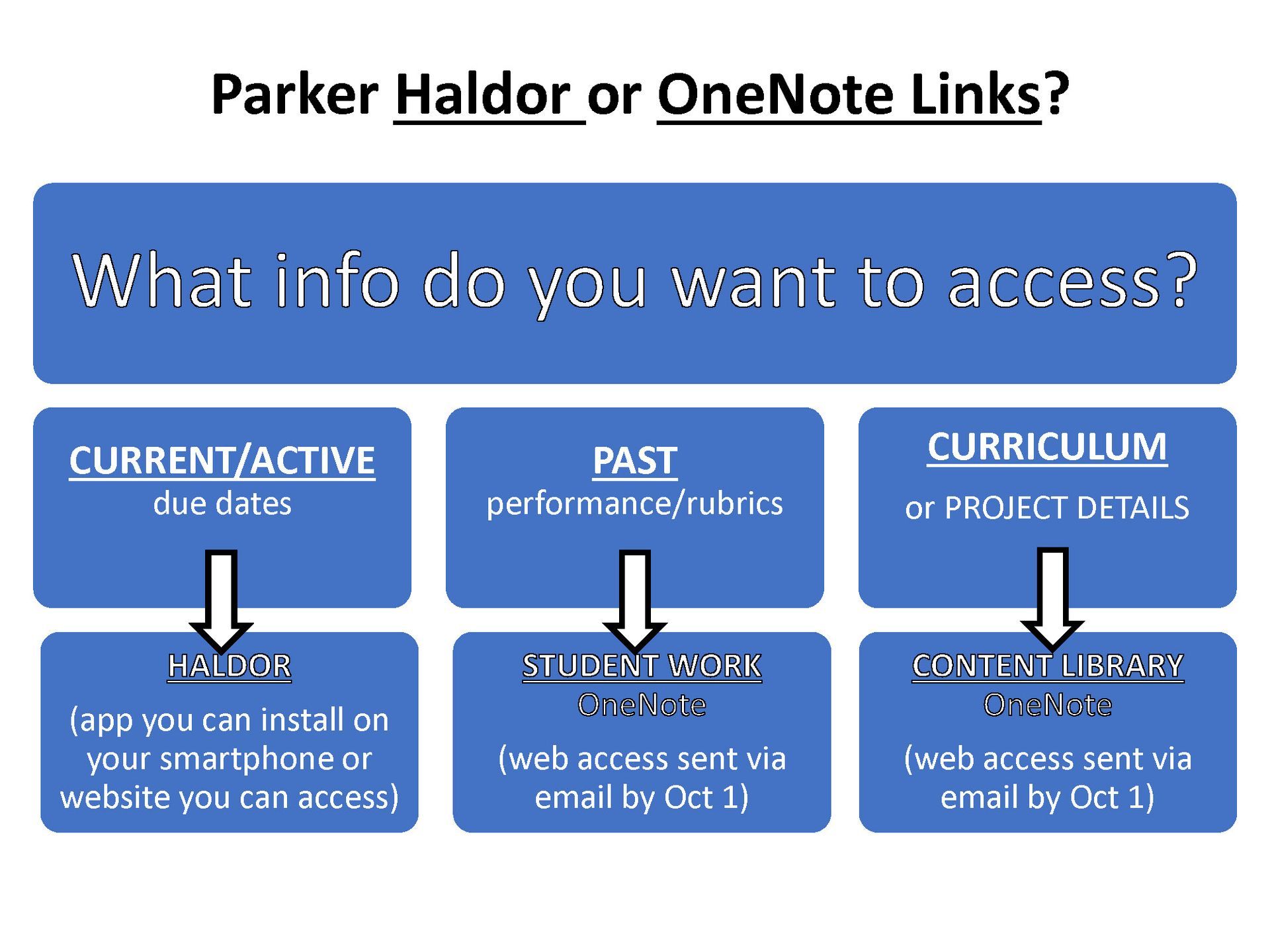
- Haldor Parent App (or website): You can download an app on your phone (or use the related website) if you want to see daily homework and project due dates. This software receives information directly from your child’s Teams Assignments. See materials here for more info.
- If you do not want to use the app, you can ask your child to show you their ASSIGNMENTS tab in Teams, where assignments are posted by teachers.
- For Div 1 students only, check your student’s physical Agenda/Assignment Book, use of which is actively prompted in most classes.
How does my child know if they are up to date in their classes?
- Each week, students (and their advisors) are sent an internal email that gives a color-coded update on their status in classes (known as RYG). Students review and reflect on this update weekly with their advisor during Academic Advising on Monday afternoons.
- If your child’s advisor sees a pattern of work completion issues, they will reach out to you. If you want to see this weekly status check, ask your child to show you.
- If you have specific concerns, please email your child’s teachers and/or advisor(s) with questions.
How/when does Parker formally communicate with parents/guardians about what and how students are doing in school?
- Progress Reports
Four times a year, Parker sends Progress Reports (and/or Final Narratives) to your email. These quarterly reports come to your email as pdf attachments, and they contain information from each class about assignment completion, academic and skill area progress, and overall comments that let you know your student’s strengths and areas for growth. You will receive these reports in:
- November
- February
- April
- June
(Click here for a “Key” to Quarterly Progress Reports: Reporting for Parents)
- PLP Conferences
Twice a year (in October and March), we invite parents/guardians to Personal Learning Plan (PLP) conversations. These parent-student-advisor conversations allow you to learn more about your child’s progress and goals for the year.
- OneNote Links
At any time, you can directly access the rubrics for your child’s major projects via the personalized OneNote links that are sent to parents/guardians in an email in late September. These links let you see the individual feedback and progress on each major assignment your child completes (pages labeled RUBRIC). The email has additional information about resources available to you in the OneNote pages, including curricular overviews and other relevant materials. Please click here for more information about OneNote links: Understanding OneNote Links
The above information about how and when we communicate with you (and your student) about academic progress is available in printable format here: Home School Communication
Online access for parents
App/Website to access nightly homework information: Haldor Info
OneNote Links to access past work and general class information:
Understanding OneNote Links
Need to contact your child’s teacher? Visit the
Contact Us webpage to get teacher emails.
An Overview of Parker’s Progress Reporting/Assessment Process
An Overview of Assessments at Parker
The text from the above linked PDFs is also below and can be translated by changing the language selection available at the bottom of this page.
- Students regularly do project work in their classes; all projects are aligned with skill areas (see the Criteria for Excellence in each skill area here).
- All projects are assessed using rubrics. Rubrics are scored using our assessment continuum (Beginning to Approaching to Meeting for most domains -- see a more in-depth explanation of the assessment continuum here).
- Each quarter, a report is sent home with some information about student progress. That report is either:
o a progress report, which highlights student strengths and next steps so far:
§ in November and April for students in Div 3 classes
§ in November, February, and April for students in Div 1 and 2 classes
o a final narrative, which summarizes the student’s performance overall for the semester/year
§ in January and June for students in Div 3 (each semester is separate)
§ in June for students in Div 1 or Div 2 classes, unless a student Gateways in January, in which case they also get a final narrative at the conclusion of their final semester in the division
o See resources available on this webpage for more information about these reports and some sample reports.
- Teachers write these progress reports and final narratives to students and their families so that everyone can share important information about student progress and performance. For students in the high school program, all final narratives comprise the raw material for a student’s narrative summary, which condenses and summarizes the final reports that teachers have written. This is the document that is sent in place of a GPA to colleges and other external audiences. See this document for more information about narrative summaries. If a student needs a transcript for other purposes before senior year (including summer program applications or to transfer to another school), a narrative record is created from the comments teachers have written – this is simply a pdf compilation of the existing reports (final narratives and the most recent progress report, if requested).
- Students review these reports in school with their advisors as part of our academic advising process. Students reflect and set goals for themselves for the coming quarter. Students are always encouraged to talk to their teachers if they have questions.
- All progress reports and final narratives go through the same process. Teachers write them, using and citing evidence from rubrics and the student’s engagement in class activities. All reports are read by the relevant domain leader (or designee) before they are sent home. Reports are sent home via a pdf emailed to the parent(s)/guardian(s). If a parent/guardian or student has a question about the content of a report, they should first reach out to the teacher. Unresolved questions can be raised to the relevant domain leader (AH, MST, Spanish, Wellness, etc.) if needed.
- Teachers have a wide variety of tools and supports available to them to assist them in aggregating the wide array of student feedback they have into a clear and coherent narrative about each student. This year, a small number of teachers are piloting the use of an internally designed tool that aids teachers in aggregating comments from multiple rubrics of student work. This tool has been designed and tested by Parker teachers to understand our assessments, rubrics, evaluation scale, and the kind of feedback included about student work in our narrative reports. This tool does have at its core an AI technology and so its use is aligned with our school statement on AI use. This means that at no time is this tool assessing or reviewing student work directly; it is only being used to aggregate comments from teachers' direct assessment of student work. All review and discernment of student work is wholly completed by teachers, and any content the tool generates is reviewed and edited by teachers, and later by domain leaders. Additionally, to ensure student privacy, this tool has been built using Playlab which does not share any data with outside AI tools for training and which adheres to privacy laws including the Family Educational Rights and Privacy Act (FERPA) and the Children’s Online Privacy Protection Act (COPPA).